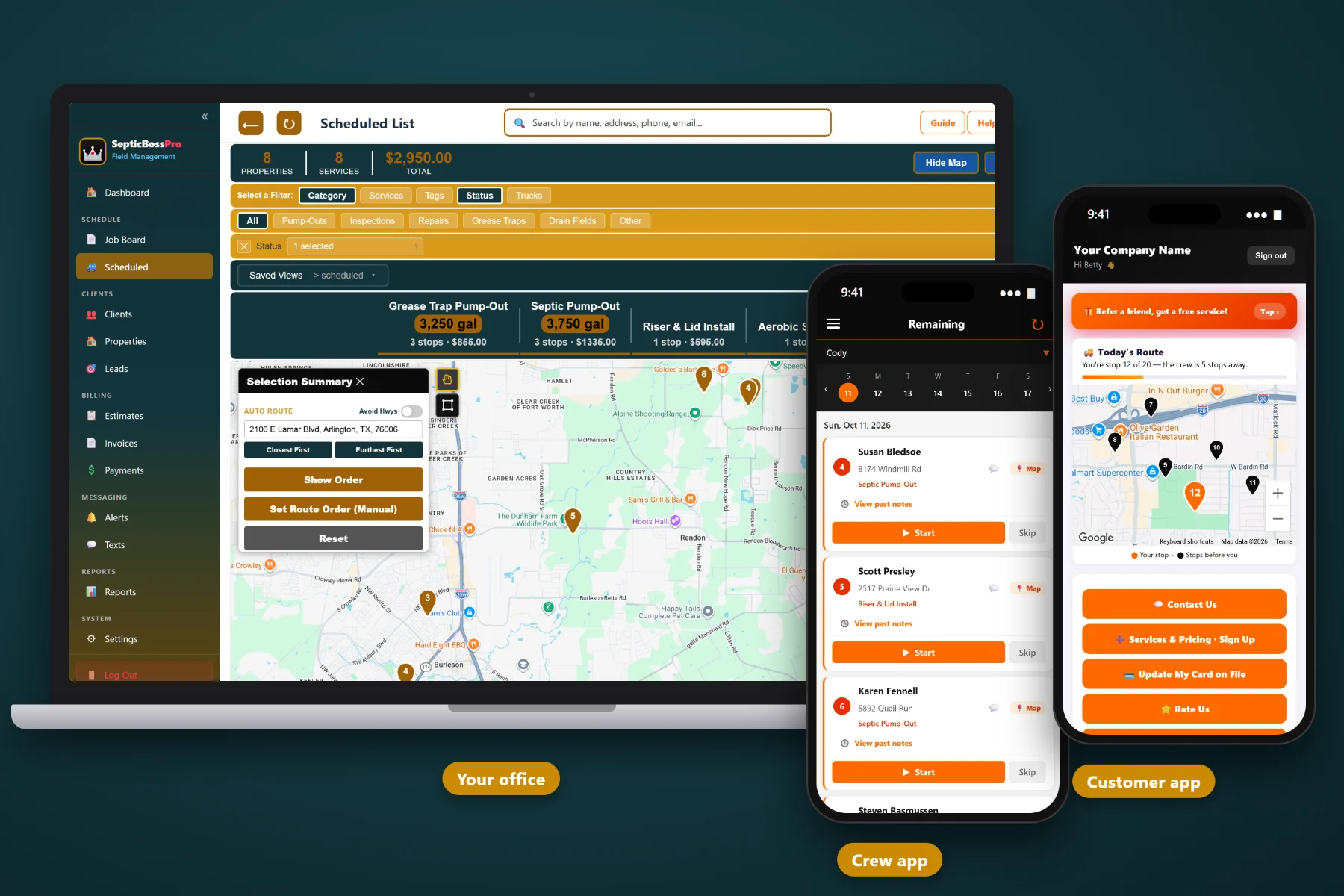
Pumping the tank is the easy part. Finding the lid, fitting the load on the truck, remembering when the customer is due again and getting the ticket billed is what eats your day. SepticBossPro keeps every tank record, pump truck, crew and pump-cycle reminder in one place — so your pumpers show up knowing exactly where to dig.
Plans start at $59/month, but SepticBossPro is not a contact list with a calendar bolted on. It knows what a tank is, how deep the lids are, which truck is going where and when the customer is due again — and you are never billed per user, so adding a driver never adds to the bill.
Tank size in gallons, lid depth in inches, drain field size and tank location notes live on the property. The next pumper reads exactly where to dig instead of probing the yard.
Assign jobs to trucks on the dispatch and job board, see the day on a route map, and move stops between trucks when a tank comes in bigger than expected.
Set a recurring job when you finish a pump-out — due again in 3 years, for example — and the next visit is already on your books. Customers come back on schedule instead of in a panic.
Drivers see each stop with its notes, GPS tracks the truck, photos capture the open tank and the finished site, and one tap marks the job complete.
Reminders, on-the-way and completed messages go out by text and email automatically, so gates are unlocked, dogs are inside and cars are off the lid when the truck arrives.
Completed jobs turn into invoices with the right line items. Store a card on file, auto-bill repeat and commercial accounts, and take payments online.
This is the heart of SepticBossPro. Before the truck arrives, the pumper sees tank size, lid depth and location notes. At the tank, they take photos and note what they found. When they tap complete, the office sees it, the customer gets a completed message, the invoice is ready and the next pump-out can already be on the books. For the full walkthrough, read Septic Pumping Software: The Complete Guide for Pump-Out Companies.
Most field service software is built for plumbers and HVAC, and septic work gets squeezed into fields that don't fit. SepticBossPro is built around tanks, trucks and pump cycles. Enter your customers and tanks, add your trucks, and you can run tomorrow's route from it.
Add your active customers with their tank size, lid depth, drain field size and location notes, then add your pump trucks. You can be scheduling real pump-outs the same day you sign up.
The dispatch and job board shows every truck, every stop and every job category in one view. Pump-Outs, Inspections, Repairs, Installs, Grease Traps and Drain Fields are easy to tell apart at a glance.
Drivers read the stop notes, take photos at the tank and tap complete. No paper ticket, no end-of-day paperwork, and no calls from the office asking where they are.
Recurring jobs bring customers back on their pump cycle, and automated texts and emails handle reminders, on-the-way notices and completed messages. The phone rings less; the schedule fills anyway.
Pumping isn't a one-off service call. Every tank you pump is a tank you'll be back to in a few years, and everything you learned on this visit — size, lid depth, where it really sits — is worth money on the next one.
Most pumping companies run on paper tickets, a whiteboard and somebody's memory. It works until a driver quits and takes the lid locations with him, until a ticket with a dump receipt falls behind the seat, or until a customer you pumped three years ago calls a competitor because nobody reminded them they were due. Generic software doesn't help, because it has no place for tank size, lid depth, drain field size or a pump cycle.
SepticBossPro does. Septic details sit on the property, trucks sit on the dispatch board, and recurring jobs turn every pump-out into the next booking. It's built around the way pump-out work actually runs.
Pumping is just one piece. To see how it fits with inspections, repairs, installs and the rest of your septic business, take a look at the full SepticBossPro platform.
Every tool in SepticBossPro was built with septic work in mind — not adapted from a generic service app and called good enough.
Record the confirmed tank size on every property. Dispatch plans loads around it, the office quotes from it, and pumpers know what is coming onto the truck before they drop the hose.
Know whether a stop needs a pry bar or a shovel before the truck leaves the yard. Deep lids also flag customers who would benefit from risers.
Measured notes from fixed landmarks — cleanout, house corner, well — so any driver on any truck finds the lid on the first probe.
Drain field size lives with the tank record, giving your crew a head start when a customer calls about a soggy yard or slow drains.
Pump-Outs, Inspections, Repairs, Installs, Grease Traps and Drain Fields each get their own category, so the board shows the shape of the day at a glance.
Assign jobs to trucks, see each truck's list for the day, and move stops between trucks when one fills early or goes in the shop.
See every stop on the map so you can group nearby tanks onto the same truck and plan the disposal run where it makes sense.
Flexible customers wait on a list instead of cluttering the schedule. When a job cancels or a route runs short, fill the gap with nearby pump-outs.
Finish a pump-out and set the next one — due again in 3 years, for example. Your future work is on the books before you leave the driveway.
Pumpers see stops and notes, GPS tracks the truck, photos attach to the job, and one tap marks it complete. No paper ticket required.
Photos of the lid location, the open tank, the baffles and the finished site stay on the job and the property — proof for disputes and support for repair estimates.
Reminders, on-the-way notices and completed messages go out automatically, cutting down on locked gates, loose dogs and cars parked over the lid.
Quote risers, baffle repairs and drain field work, and let customers approve from their phone. Approved work drops onto the schedule.
Completed jobs become invoices with the right customer, property and line items attached — including digging, extra gallons or trip charges.
Store a card for repeat and commercial accounts and bill them automatically, so pump-outs at empty rentals and closed restaurants still get paid.
Customers pay invoices online instead of mailing a check. Every payment is tied to the job and the property it came from.
Run restaurant grease trap accounts on recurring schedules in their own category, with access notes for before-opening and after-close service.
Schedule inspections alongside pump-outs for realtor deadlines and older systems, with notes and photos from the crew app attached.
See jobs completed, revenue, unpaid invoices and upcoming recurring work so you know how each truck and each week is really doing.
When the house sells, the tank record stays with the address. The new owner calls, and you already know what's in the ground.
The office sees where trucks actually are, so emergency calls go to the closest truck with room and customers get honest arrival times.
Add drivers, helpers and office staff without a per-seat bill. The Crew plan includes unlimited users.
Try it with your own customers, tanks and trucks for 14 days. No credit card required to start.
Most homeowners forget their tank exists until the toilets stop draining — and then they call whoever answers first. SepticBossPro recurring jobs fix that. When you finish a pump-out, set the next one on a cycle that fits what you saw in the tank, and automated reminders bring the customer back to you on schedule. Learn how in Septic Pump-Cycle Reminders: Turning One-Time Pump-Outs Into Repeat Customers.
The pumper reads the notes, finds the lid, pumps the tank and takes photos of what he saw. One tap marks it complete. The customer gets a completed message, the invoice is built from the job, and repeat or commercial accounts are charged to the card on file. If the crew found a broken baffle or a deep lid, an estimate with online approval goes out the same day.
Pick the plan that fits your operation. Adding a driver or an office helper never adds a per-seat charge, and every plan starts with a 14-day free trial.
No credit card required. 14-day free trial. Never billed per user.
Every property record holds tank size in gallons, lid depth in inches, drain field size and tank location notes. Those details show up for the pumper in the crew app before they arrive, and they stay with the property when the house sells.
Yes. Recurring jobs let you set the next pump-out on a cycle — for example, due again in 3 years — and automated texts and emails remind the customer when it comes due. Grease trap accounts can recur on their own, shorter schedules.
You set up your trucks and assign jobs to them on the dispatch and job board. Route maps show where each truck is headed, GPS in the crew app shows where trucks actually are, and jobs can be moved between trucks when the day changes.
Pumpers see each stop with its notes, GPS tracks the truck, they can take photos of the lid, the open tank and the finished site, and they mark the job complete with one tap. The office sees it immediately.
Yes. Completed jobs become invoices, you can store a card on file and auto-bill repeat or commercial accounts, customers can pay online, and estimates for repairs or risers can be approved online.
Start is $59/month, Pro is $89/month and Crew is $199/month with unlimited users. You are never billed per user. Every plan starts with a 14-day free trial and no credit card is required.
Pumping is just one piece — SepticBossPro also runs inspections, repairs, installs, grease traps and drain field work from the same platform. See the full SepticBossPro overview.
Practical guides on running pump-out work: tank records, pump trucks, gallons, disposal tickets, pump-cycle reminders, crew apps and getting paid. Start with Septic Pumping Software: The Complete Guide for Pump-Out Companies.
SepticBossPro keeps every tank record, pump truck and pump-cycle reminder in one place, so your crews pump more tanks and your customers keep coming back. Try it free for 14 days.