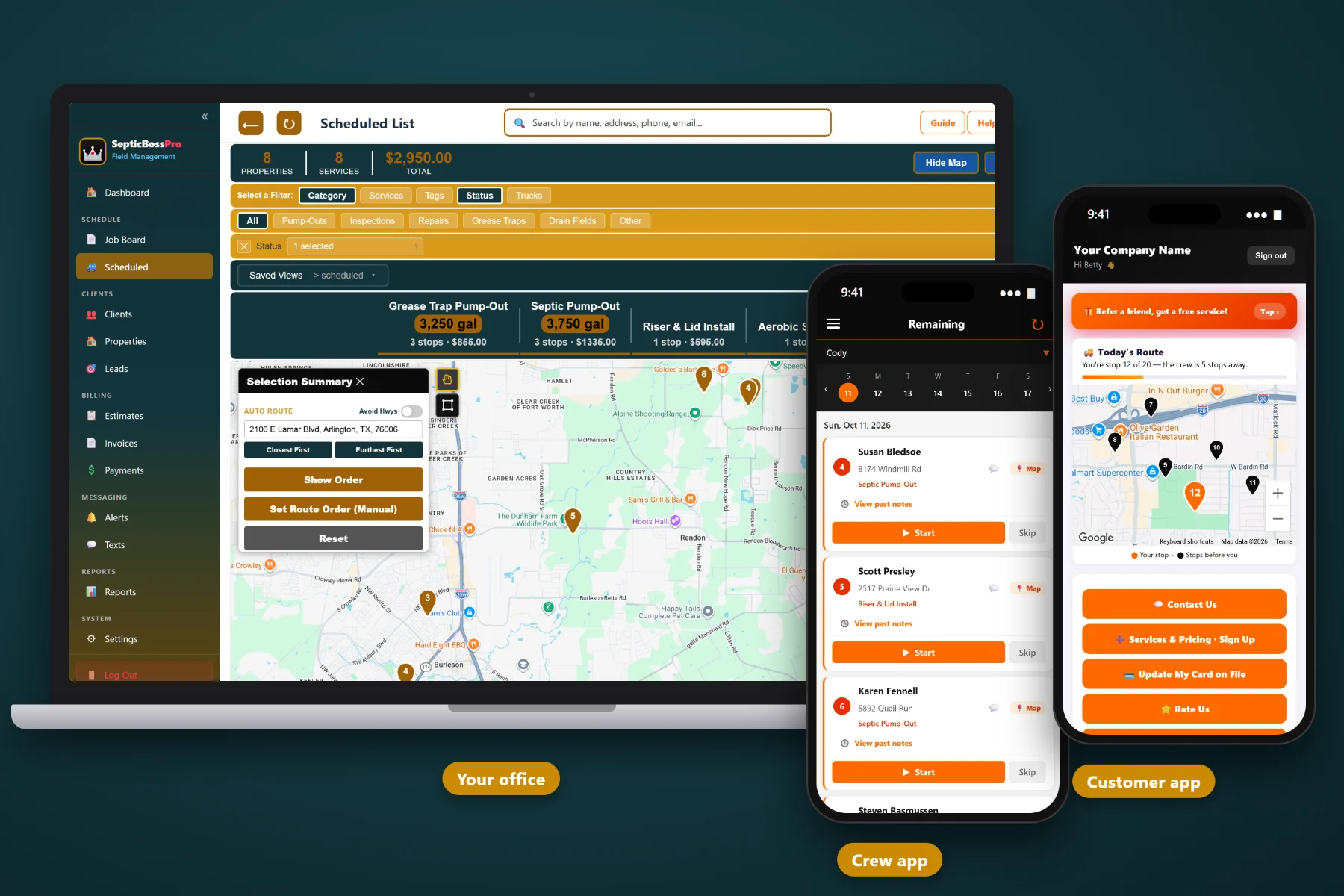
Septic work does not fit a generic appointment calendar. Every pump-out depends on tank size, lid depth and where the tank actually sits, and every day gets interrupted by an emergency backup or a realtor with a closing date. SepticBossPro is scheduling and dispatch software built around the waiting list, the job board, recurring pump cycles and the trucks and crews that run them.
Plans start at $59/month, and what you get is built for the way septic companies really run — a waiting list for non-urgent pump-outs, a dispatch board for the day, recurring jobs for pump cycles, and property records that tell the driver where the lid is before the truck leaves the yard. Never billed per user.
Every pump-out request that does not need to happen today goes on the waiting list with its property details attached. Schedule from it by area and truck when you are ready, instead of booking whatever slot was open when the phone rang.
One job board shows every truck, crew and stop for the day, labeled by job category. When a lid is deeper than expected or an emergency comes in, the office sees the whole day and moves the right job.
Set a recurring job when you close out a pump-out and the next service is already on your books. Automated reminders bring the customer back to you, not to whoever mailed a coupon first.
Tank size in gallons, lid depth in inches, drain field size and tank location notes live on every property. The office schedules realistic days and drivers find the lid without probing half the yard.
Automated reminders before the appointment, an on-the-way message when the truck heads over, and a completed message when the job is done. Fewer "when are you coming?" calls to the office.
Drivers see their own stops with notes, tank details and access instructions. They take photos, mark jobs complete and share GPS, so the office knows what is done and where every truck is.
The dispatch board is where the plan meets the real day. Jobs move onto it from the waiting list once they have a date, a truck and a crew. Each stop carries its job category, so a two-hour drain field repair never gets mistaken for a twenty-minute pump with a riser. When a driver calls in or an emergency lands, the dispatcher has the whole day in front of them.
A scheduling system only works if the office and the drivers actually use it. SepticBossPro keeps each screen focused on the job in front of you, so a new dispatcher or a driver who hates phones can be productive on the first day.
Add customers and properties with what you know: tank size, lid depth, drain field size and where the tank is. Records do not need to be perfect on day one. They get better every time a driver adds a note or a photo.
Every sticky note and "call me back next week" goes on the waiting list with a job category. For the first time, you can see your real backlog in one place and schedule it by area instead of by the order the phone rang.
Give each job a date, a truck and a crew, and it lands on the dispatch board and in the driver's crew app. No reading addresses over the phone, no whiteboard that only one person can decipher.
Turn on reminders, on-the-way and completed messages, set recurring jobs for pump cycles and connect invoicing and card on file. From there, the follow-up work happens on its own while your trucks keep pumping.
A septic job is not just an appointment. It is a truck with a limited tank, a lid somebody has to find, a dump run that has to fit somewhere in the day, and a customer who wants to know when you are showing up.
A calendar app does not know that a 1,500-gallon tank with a lid two feet down takes longer than a 1,000-gallon tank with a riser by the driveway. It does not hold non-urgent pump-outs until you have enough in one area to fill a truck. It does not remind a homeowner that their tank is due again, or text them when your driver is on the way.
So the real schedule ends up living on a whiteboard, a stack of sticky notes and the owner's memory. That works until an emergency backup lands at 10 a.m., the ground freezes, or the one person who knows where every lid is takes a day off. SepticBossPro puts all of it in one system the whole office and every driver can see.
To see how the pieces fit together — waiting list, dispatch board, recurring cycles, emergencies, trucks and weather — start with Septic Scheduling Software: The Complete Guide for Pumping Companies.
Every tool here is aimed at the way septic companies book, dispatch and bill — from the first phone call to the payment.
Hold non-urgent requests until you are ready to schedule them. Pull jobs off the list by area and truck capacity so each day is a tight, realistic loop.
See every scheduled job for the day with its truck, crew and category. Move jobs between trucks when the day changes, without losing notes.
Set the next pump-out as a recurring job at close-out. Residential, commercial and grease trap accounts each get the cycle that fits them.
Triage the call, check the board and crew GPS for the closest truck, and slide a flexible stop to make room. The rest of the day keeps moving.
Pump-Outs, Inspections, Repairs, Installs, Grease Traps and Drain Fields. Every truck's day is readable at a glance, and reports break work down by type.
See scheduled and waiting jobs on a map to group pump-outs by area, plan loads around the dump site and cut drive time between stops.
Track trucks and assign each job to a vehicle and crew, so capacity, equipment and experience match the work on every stop.
Tank size (gal), lid depth (in), drain field size and tank location notes on every property, so every future visit is faster to schedule and run.
Move a job to a new date or back to the waiting list with a note on why. Lid depth and location notes help spot weather-sensitive stops the day before.
Reminders, on-the-way and completed messages by text and email go out for every job without anyone in the office picking up the phone.
Drivers see their stops, notes and tank details, take photos, mark jobs complete and share GPS with the office.
Turn a broken baffle, a deep lid or a soggy drain field into an estimate the customer can approve online. Approved work goes straight into scheduling.
Invoice from the completed job, charge a card on file, and auto-bill recurring commercial and grease trap accounts.
Review completed jobs, categories and billing each week to see whether the waiting list is growing and where your work is coming from.
Add drivers and office staff without per-seat charges. The Crew plan includes unlimited users.
Homeowners forget about their septic tank for years, then call whoever shows up first in a search. Recurring jobs change that. Set the next cycle when you close out the job, and automated reminders go to the customer when the tank comes due. Over a few seasons, that becomes a steady base of repeat pump-outs you can plan around. For the full picture of how recurring work fits into daily scheduling, read Septic Scheduling Software: The Complete Guide for Pumping Companies.
Assign a job and it lands in the driver's crew app with the property details attached. They see the tank size, the lid depth, the location notes and the gate code, do the job, take a photo and mark it complete. The office sees the board update, and the customer gets the completed message automatically.
Pick the plan that fits your fleet today. Every plan starts with a 14-day free trial, no credit card required.
14-day free trial. No credit card required. Never billed per user.
Practical guides on waiting lists, dispatch boards, recurring pump cycles, emergencies, trucks, crews, weather and access — written for septic companies.
Yes. SepticBossPro is scheduling and dispatch software built around septic work: a waiting list for pump-out requests, a dispatch board for the day, recurring jobs for pump cycles, property records with tank size, lid depth, drain field size and tank location notes, and job categories for Pump-Outs, Inspections, Repairs, Installs, Grease Traps and Drain Fields.
Non-urgent requests go on the waiting list with their property details attached. When you are ready, you schedule jobs from the list onto the dispatch board with a date, truck and crew, usually grouping them by area so each truck runs a tight day.
When you finish a job, set a recurring job for the next pump-out. When it comes due, an automated reminder goes to the customer by text or email so they book with you again. Grease trap and commercial accounts can run on much shorter cycles than residential tanks.
The dispatcher sees every truck's stops on the board, uses crew GPS and the route map to find a good truck, and moves a flexible job to another truck or a new date. Moved jobs keep their notes, and the reminder and on-the-way messages follow the new date.
Yes. Track your trucks, assign each job to a truck and crew, and every driver sees their own stops in the crew app. SepticBossPro is never billed per user, and the Crew plan includes unlimited users.
Start is $59/mo, Pro is $89/mo and Crew is $199/mo with unlimited users. Every plan starts with a 14-day free trial, no credit card required.
SepticBossPro schedules, dispatches, reminds and bills your entire septic operation from one platform — see the full platform overview.
Put your waiting list, dispatch board, recurring pump cycles and crew app in one place. Try SepticBossPro free for 14 days.